


Krispy Kreme
3.27.11K Reviews
App Specs
- Version
- 2026.08.03
- Updated On
- License
- Free
- Downloads
- 1,000,000+
- Developer
- Krispy Kreme
- Categories
- Food & Drink
- Platform
- Android, iOS
Screenshots

 Analysis by AppCompare
I like the idea behind the Krispy Kreme app: it brings ordering, loyalty and store discovery together for people who already enjoy stopping for doughnuts. That focus makes it more useful than a digital menu alone, especially when I know what I want and would rather plan a pickup than decide at the counter. It is a free Food & Drink app from Krispy Kreme, and I see it as a handy extra for regular customers rather than a must-have for everyone.
Its appeal depends on how often you visit and whether using a phone fits the way you buy. If Krispy Kreme is an occasional treat, browsing the menu in person may be just as easy. But if you make repeat visits, want to keep an eye on loyalty rewards, or like checking for a nearby shop while out, having those tasks in one place can make the stop feel more straightforward.
Where the app earns a place on my phone
The strongest case for installing it is the combination of practical errands. I can think about where to go, what to order and whether a reward applies without juggling separate tools. That is a small convenience, not a reason to visit more often by itself, but it matters when I am already planning a doughnut run.
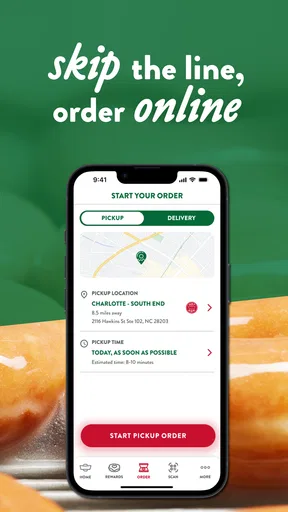
A useful way to approach mobile ordering is to decide what you want before you arrive, then treat the app as a planning aid rather than assuming every visit will be faster. For a busy morning, I would place an order ahead only when I have enough time to select a location and pickup plan carefully. If plans are uncertain, ordering at the counter avoids having to coordinate a pickup around a changing schedule.
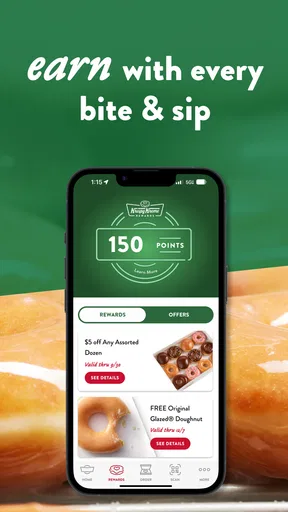
The loyalty element is most valuable to people who already buy from Krispy Kreme. I would check the rewards area after a purchase and before a later order, so I know what progress or redemption options are available instead of guessing at the counter. That simple habit also helps me decide whether to use the app on a particular visit or keep the transaction simple.
Store discovery has a different sort of value. When I am away from my usual area, finding a nearby Krispy Kreme can be more convenient than searching broadly and sorting through unrelated results. I would still check the selected location before placing an order: a nearby result is useful only if it is the shop I actually intend to visit.
What to expect from the experience
The app has been around since December 15, 2011, and its current version is 2026.04.27. It has an average rating of 3.2 from around 16,000 ratings, alongside around 7,100 written reviews, and more than 1 million installs. Those figures suggest a sizeable audience but also a mixed reception, so I would not assume the experience is equally smooth for every customer or device.
Worth Reading Before You Choose

EA SPORTS FC Mobile 26 Is a Bigger Football Game, but It Takes Time

Flipboard Shows What News Apps Must Do Beyond the Feed

Switching to Android Auto Means Rethinking Your Driving Routine

Google Calendar Makes a Crowded Week Easier to Manage

Ludo King Makes the Most of the Minutes Between Plans

Baby Panda World Brings Quick Play to Modern Phones, but Its Game Library Feels Busy
For a realistic visit, imagine I am heading out with a short break and want to pick up a box for colleagues. I can use the location finder to choose a shop, look through the menu and prepare an order before setting off. The useful part is reducing decisions at the destination; the trade-off is that I need to be confident about where I am going and when I will get there. If the route or schedule changes, walking in and ordering in person may be the calmer option.
This is also where the app differs from the usual alternatives. A general map or search app can help me locate food nearby, and a delivery service may be more suitable when I want food brought to me. The Krispy Kreme app is more focused on the brand’s own stores and loyalty experience, so it makes the most sense when I have already chosen Krispy Kreme and plan to collect or visit. It is not a replacement for comparing many bakeries or finding the broadest local selection.
The app is aimed at Everyone, and it is compatible with Android versions starting at 7.0. That broad accessibility is useful, though I would still consider whether I actually want another account-based food app on my phone. If I only stop in once in a while, I can skip the installation and order directly at a shop. If I visit regularly, the combination of rewards and ordering gives the app a clearer purpose.
Small habits that make it more useful
One practical tip is to separate browsing from committing. I would look through the menu and offers before I am in a rush, then place an order only once I know the location and timing suit me. That avoids turning a quick treat into a last-minute coordination problem. Promotions can be a welcome extra, but I would not choose a visit solely because an offer appears; the location and the food I actually want matter more.
Another trade-off is convenience versus flexibility. Ordering ahead can make pickup feel simpler, but it asks me to settle on a plan earlier than an in-store purchase does. For a spontaneous craving, the app’s store-finding role may be enough; for a planned group stop, placing an order can help me organize what to pick up. I would keep the order modestly planned rather than assuming the app will solve every timing issue.
As a long-running product, it has had time to evolve, but that does not mean I would treat every screen or process as flawless. Its moderate rating is a reason to approach it with ordinary expectations: useful when the core tools suit your routine, but not something I would rely on as the only way to make a purchase. Keeping the option to order in person is sensible, particularly if a visit is time-sensitive.
Getting Started with the Krispy Kreme App
Alright, let's kick things off with the basics. The Krispy Kreme app is available for both Android and iOS, making it super accessible whether you're Team Apple or Team Android. Downloading it is a breeze – just a quick search in your app store, a couple of taps, and you're good to go.
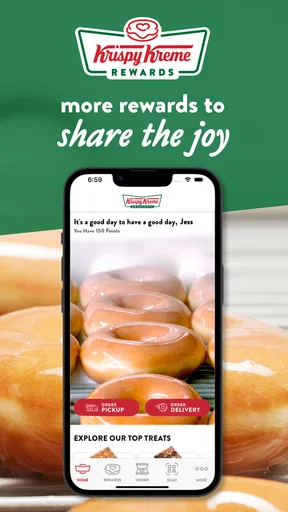
Once you've got it installed, the first thing you'll notice is its sleek and simple design. It's like walking into a Krispy Kreme store – everything is laid out in a way that makes you feel welcome and ready to explore. The app's user interface is intuitive, so you won't need a degree in tech to navigate through it.
Features You Can't Miss
Now, let's talk about what this app can do for you. First up, the rewards program. If you're a regular at Krispy Kreme, this feature is a game-changer. You earn points with every purchase, which you can later redeem for free doughnuts. Who doesn't love free doughnuts?
Another nifty feature is the location finder. Say you're out and about and suddenly crave that classic glazed goodness. The app will quickly show you the nearest Krispy Kreme store, complete with directions. It's like having a doughnut GPS in your pocket.
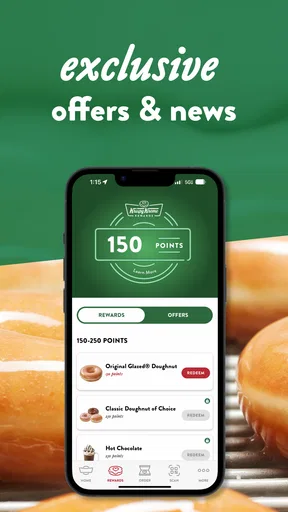
Ordering through the app is as easy as pie – or should I say doughnut? You can browse the menu, customize your order, and even schedule a pickup time. The app also keeps you in the loop with the latest promotions and offers, so you never miss a sweet deal.
Personal Experience and Usability
I've been using the app for a while now, and I must say, it's become a staple on my phone. The convenience is unbeatable. I love being able to place my order ahead of time and skip the line, especially during those busy weekend mornings when everyone seems to have the same idea.
The reward system is also pretty generous. It didn’t take long for me to rack up enough points for a free doughnut. And trust me, that first freebie tastes even sweeter.
One thing that stands out is how smooth the app runs. I haven’t experienced any crashes or bugs, which is a huge plus. The developers seem to be on top of regular updates, ensuring everything runs like a well-oiled machine.
Final Thoughts
In a world where convenience is king, the Krispy Kreme app hits the mark. It's like a one-stop-shop for all things doughnut-related. Whether you’re a die-hard fan or just someone who enjoys the occasional treat, this app makes satisfying your cravings easier than ever.
So, if you haven’t already, give the Krispy Kreme app a whirl. It might just become your favorite way to indulge in those sugary delights. Just make sure to keep an eye on your rewards points – they're your golden ticket to free doughnuts. Happy snacking!
Pros
- User-friendly interface for easy navigation.
- Real-time updates on promotions and offers.
- Convenient store locator feature.
- Effortless online ordering process.
- Loyalty program rewards frequent customers.
Cons
- Limited customization options for orders.
- Occasional app crashes reported by users.
- Requires constant internet connection.
- Large app size may affect device storage.
- Account creation needed for full features.
FAQs for Krispy Kreme
What features does the Krispy Kreme app offer?
The Krispy Kreme app provides users with a range of features including the ability to locate nearby stores, view the menu, and access exclusive offers. Users can also earn and track reward points through the app, receive notifications about hot, fresh doughnuts, and place orders for pickup or delivery.
How does the Krispy Kreme rewards program work within the app?
The Krispy Kreme rewards program allows users to earn points on qualifying purchases made through the app. For every dollar spent, points are accumulated which can later be redeemed for free doughnuts and other treats. The app also notifies users of special promotions and bonuses to help earn points faster.
Is the Krispy Kreme app available for both Android and iOS?
Yes, the Krispy Kreme app is available for download on both Android and iOS platforms. Users can easily find the app on Google Play Store for Android devices and the Apple App Store for iOS devices. The app is designed to offer a seamless experience across both operating systems.
Are there any costs associated with downloading or using the Krispy Kreme app?
Downloading and using the Krispy Kreme app is completely free. Users do not incur any charges for accessing the app’s features, tracking rewards, or receiving notifications. However, costs are applicable for purchases made through the app, and standard data rates may apply depending on your mobile carrier.
Can I customize my orders through the Krispy Kreme app?
Yes, the Krispy Kreme app allows users to customize their orders. Whether it's selecting your favorite doughnuts or specifying particular preferences for coffee and beverages, the app provides a user-friendly interface to tailor your order to your liking. This ensures a personalized and convenient ordering experience.


